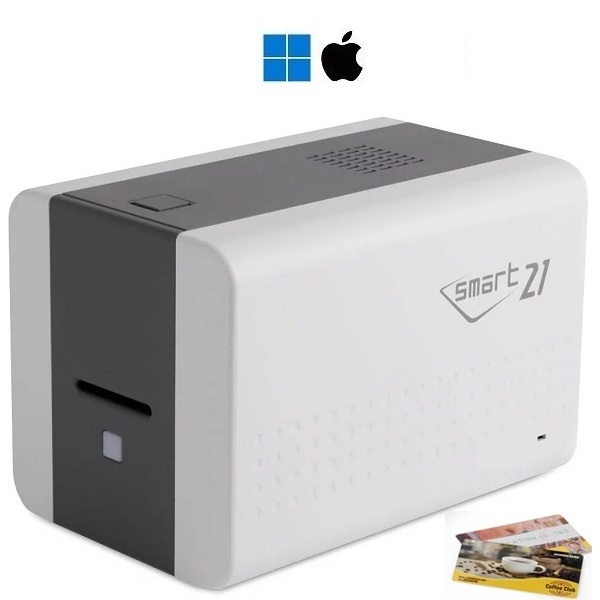
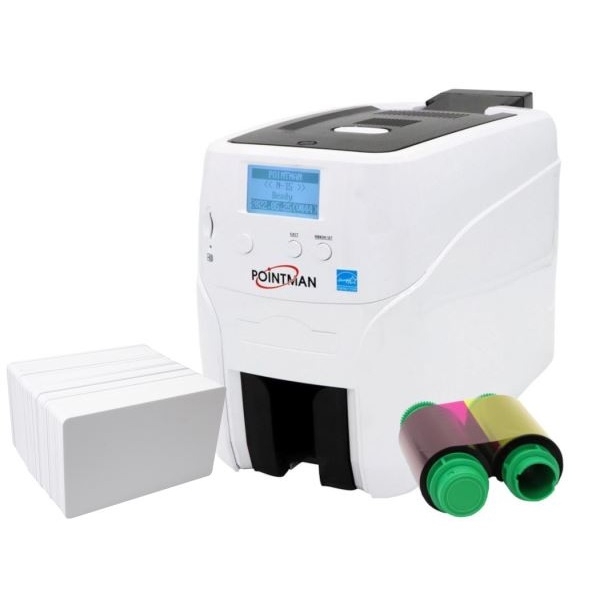
Two complete starter kitsGet started producing professional ID cards without assembling the equipment yourself. Choose Smart-21 for simple card production one card at a time – or Pointman N15 when automatic card feeding and networking should make the workday more efficient.
Everything you need gathered from the start
Both solutions include a card printer, software, white plastic cards, and color ribbons.Therefore, you can create a card design with, for example, name, photo, title, logo, number, barcode, or QR code and start printing cards as needed.
The main difference is the workflow: Smart-21 is a compact handheld printer, while Pointman N15 has automatic feeding of a stack of cards, output tray, display, and built-in Ethernet.
Our brief recommendation: Choose Smart-21 when a low starting price and simple issuance of a few cards are most important.Choose Pointman N15 when you print series more often, or when multiple computers need to be able to reach the printer via the network.
Choose the starter package that fits your everyday needs
Lowest starting priceSmart-21 starter package
Compact and hand-fed solution for simple production of ID cards, membership cards, and guest cards one card at a time.
- Smart-21S single-sided card printer with USB
- 100 white CR80 plastic cards
- YMCKO color ribbon for 100 cards
- Plastic card software for Windows or Mac
- Double-sided card via manual flipping
Current offer price 4,465.00 kr.excl.moms and delivery
More efficient workflowPointman N15 starter package
Automatic card feeder, output tray, display, and Ethernet for organizations that want to print more cards with fewer manual steps.
- Pointman Nuvia N15 with USB and Ethernet
- Automatic feeder for 80–100 cards
- 100 white CR80 plastic cards
- YMCKO color ribbon for 200 cards
- Software for Windows or Mac
Current offer price 5.995.00 kr.excl.moms and delivery
The product's current price and stock status on the product page are always applicable.
Smart-21 and Pointman N15 compared
| Feature | Smart-21S | Pointman N15 |
|---|
| Card input | Manual – one card at a time | Automatic – feeds up to 80–100 cards |
| Output tray | No, cards are fed manually | Yes |
| Connectivity | USB | USB and built-in Ethernet/RJ45 |
| Operation | LED status button | Display with status information |
| Color printing | Single-sided DTC printing; back side via manual flipping | Single-sided DTC printing |
| Starter consumption | 100 cards and color ribbon for 100 cards | 100 cards and color ribbon for 200 cards |
| Best for | A few cards as needed and lowest investment | Repeated print jobs, series and network use |
What can you use the starter packages for?
- Employee and staff cards
- Guest and visitor badges
- Member and association cards
- Student and pupil cards
- Access cards with visible printing
- Customer cards and loyalty cards
- Name badges with photo and title
- Cards with barcode or QR code
When should you choose a different card printer?
Both models are single-sided direct-to-card printers.
If both sides of the card are to be produced automatically, you should choose a printer with automatic duplex. If the design is to extend all the way beyond all four edges, or if you are printing on technology cards with an uneven surface, you should also compare with a retransfer printer.Frequently asked questions
Are both starter kits ready to use?
Yes. Both kits include printer, software, white plastic cards, and color ribbon.You need a compatible computer and to create the desired card design.
Which model is easiest if we only print a few cards?
Smart-21 is the simplest and cheapest solution when cards are typically produced individually. Each card is manually placed in the printer.
When does Pointman N15 make the most sense?
N15 is the stronger choice when you want to place a stack of cards in the printer, collect the finished cards in a tray, or connect the printer via Ethernet.
Can we print on the back side?
Smart-21 can print the back side with manual flipping. Pointman N15 is also a single-sided model. If you have ongoing needs for automatic printing on both sides, you should choose a duplex printer.
Can the starter kits be used for access cards?
Yes, they can print the visible design on access cards.The card type must match the access system, and special card types should be checked before ordering.
Still torn between the two?
Tell us roughly how many cards you expect to print, whether multiple computers will use the printer, and whether the cards need printing on both sides. Then we'll help you choose right the first time.